1. Export a Final Cut 7 XML marker file from Adobe Premiere Pro
Open the sequence in Premiere Pro and go to File > Export > "Final Cut Pro XML".
2. Use the "Convertor de marcaje" to convert the Final Cut 7 XML marker file into a CSV file
Open the free Convertor de marcaje, select "Adobe Premiere Pro > Sequence (.xml)" and set "convert" to "CSV for Google Sheets". Generate and download the file. Dacă aveți probleme la conversia fișierului, puteți contacta asistența gratuită.
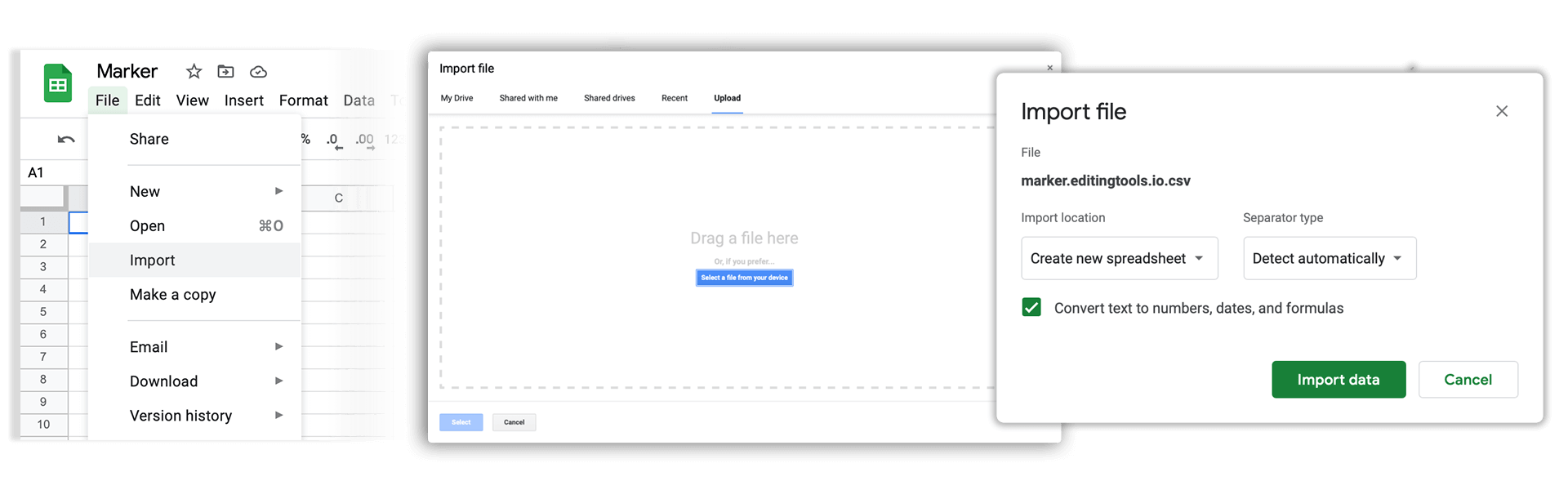
3. Import the CSV file into Google Sheets
Open Google Sheets and go to "File -> Import". Upload the generated CSV file and press "Import Data" to generate the Sheet with all markers.
🚀 Gata
Deocamdată asta e tot! Dacă tutorialul vi s-a părut util, vă rugăm să-l distribuiți pentru a ne susține. Dacă aveți sugestii despre cum am putea îmbunătăți fluxul de lucru, vă rugăm să ne anunțați!