1. Export a CSV marker file from Pix
Open the comments panel on the right side in Pix. Press the three dots and select "Export". Now you can then download the CSV file from Pix.
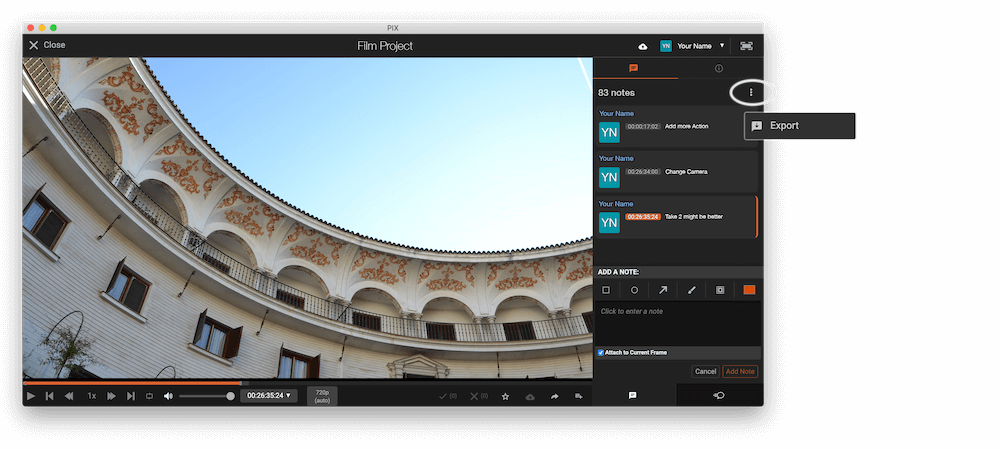
The timecode in Pix starts with 00:00:00:00 for each clip, so you may need to use the offset function on EditingTools.io to sync it with you timeline or move it manually in your NLE (editing software).
2. Use the "Convertor de marcaje" to convert the CSV marker file into a YouTube Chapter Markers (.txt) file
Open the free Convertor de marcaje, select "Pix Systems > Comments (.csv)" and set "convert" to "YouTube Chapter Markers (.txt)". Generate and download the file. Dacă aveți probleme la conversia fișierului, puteți contacta asistența gratuită.
3. Copy Chapter Markers into the video description
Open the generated .txt file. Copy and paste the newly generated markers into your video's description.
🚀 Gata
Deocamdată asta e tot! Dacă tutorialul vi s-a părut util, vă rugăm să-l distribuiți pentru a ne susține. Dacă aveți sugestii despre cum am putea îmbunătăți fluxul de lucru, vă rugăm să ne anunțați!